Help Center › Recover and back up
How to set up passkey recovery in Scrypt Wallet (Face ID, Touch ID or fingerprint)
Short answer: Open Profile, choose Passkeys, and press Add a passkey. Your device saves it, and where it syncs through iCloud Keychain or Google Password Manager it can follow you to a new device. A passkey is an extra way back in, so keep your backup file as well.
Questions this guide answers
- How do I use Face ID to recover my wallet
- Scrypt Wallet passkey setup
- Does a passkey replace my backup
- Recovery passkey iCloud Keychain Google Password Manager
What a passkey does here
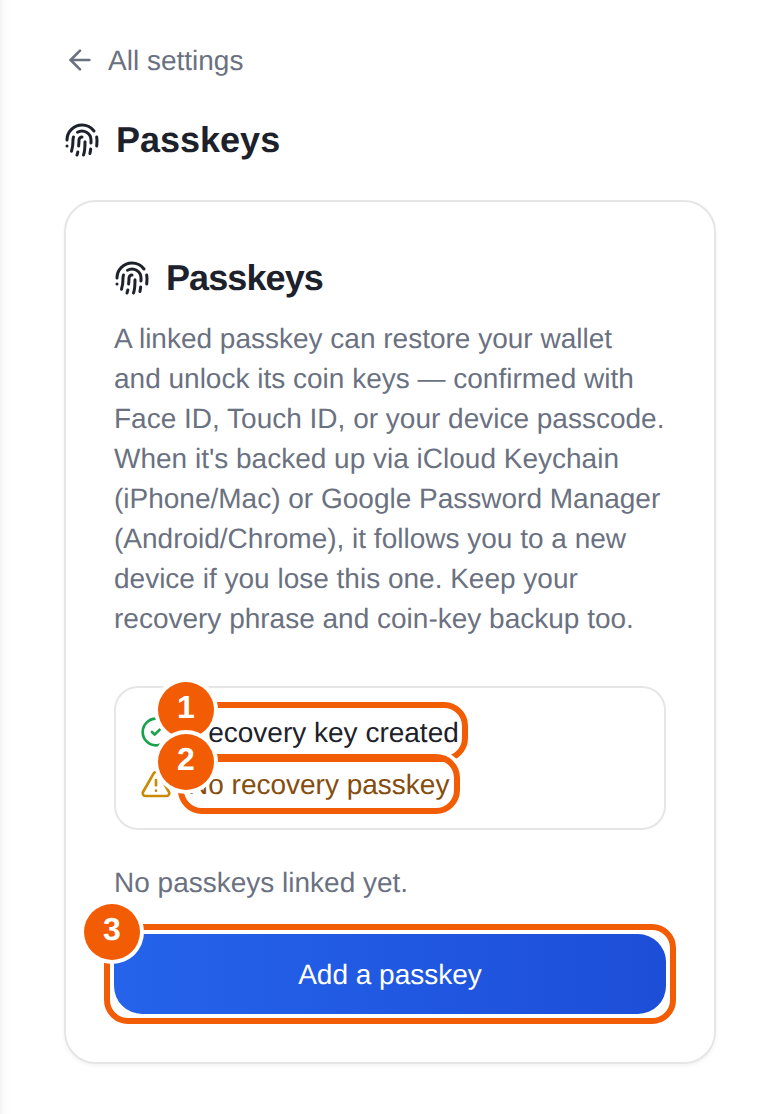
A linked passkey can restore your wallet and unlock its coin keys. You confirm it with Face ID, Touch ID or your device passcode. When the passkey is backed up through iCloud Keychain (iPhone and Mac) or Google Password Manager (Android and Chrome), it follows you to a new device if you lose the old one.
It is an extra layer. Keep your recovery phrase and coin-key backup too. Support depends on your device and passkey provider.
Add a passkey
- Open Profile from the menu.
- Choose Passkeys.
- Look at the checklist. Recovery key created with a green check means your wallet has its recovery key. No recovery passkey with a warning means you have not added one yet.
- Press Add a passkey and approve it with Face ID, Touch ID or your passcode.
You can also start from the home screen. A card called Protect your wallet if you lose this device has an Add recovery passkey button, and it says setup takes about 30 seconds.
Using it later
On a new device, open the sign-in sheet and go to Restore an older account, then choose Passkey. See How to get back into your Scrypt Wallet.
Limits to know
- A passkey only works where your browser and passkey provider support it, and on the official wallet address.
- Some providers cannot protect wallet backups. If that is you, rely on your saved backup file.
- A passkey never replaces your backup. If you lose every device and your passkey provider account, the backup is what gets you in.
Frequently asked questions
Does a passkey replace my backup file?
No. Keep the backup. The passkey is an additional way to recover.
Which devices work?
Passkey recovery needs a browser and passkey provider that support it. iCloud Keychain on iPhone and Mac, and Google Password Manager on Android and Chrome, are the two the wallet describes.
Where do I check if I have a passkey?
Profile, then Passkeys. The checklist shows whether a recovery passkey is linked.
Passkey sign-in does not work.
Use your saved backup instead, and report the problem from Profile, Report an issue. Include your device and browser, and never include keys.