Help Center › Features
How to see your NFTs in Scrypt Wallet: the NFT gallery for Solana and Ethereum
Short answer: Open the NFT gallery (NFTs in the menu or at /nfts). It shows NFTs held at the Solana and Ethereum addresses on your account. Tap Receive to see those addresses, send an NFT there from another wallet, then Refresh. Possible spam is tucked away, not deleted.
Questions this guide answers
- Does Scrypt Wallet support NFTs
- Where is the NFT gallery in Scrypt Wallet
- Why is my NFT not showing
- What is the spam tab for NFTs
Open the gallery
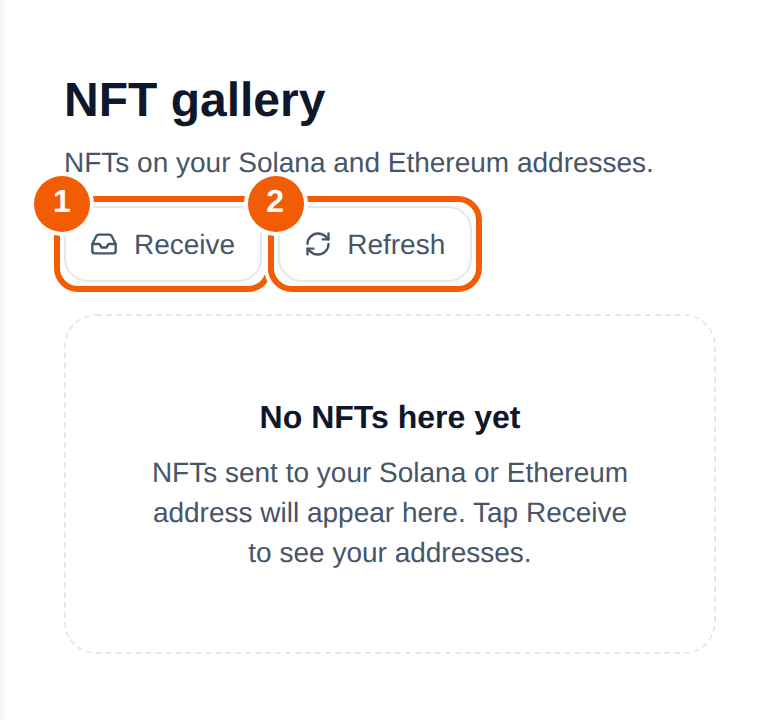
Open the NFT gallery from the menu, or go to wallet.scryptwallet.io/nfts. The page is titled NFT gallery and says it shows NFTs on your Solana and Ethereum addresses.
What you can do
- Receive ①: shows the Solana and Ethereum addresses on your account, so you can send an NFT to them from another wallet. Use the address for the right chain: a Solana NFT goes to the Solana address, and an Ethereum NFT to the Ethereum address.
- Refresh ②: reloads the gallery after a transfer.
- Browse by collection, and open an NFT to see its details such as traits and explorer links.
- Spam: NFTs that look unwanted are tucked into a separate spam bucket. They are never deleted, and you can look at them there.
A new account with no NFTs shows "No NFTs here yet. NFTs sent to your Solana or Ethereum address will appear here."
If an NFT is missing
- Confirm which chain it is on, and that you sent it to the matching address from Receive.
- Press Refresh and wait a moment.
- Check the transaction on the chain's block explorer to be sure it confirmed.
- Look in the spam bucket in case the gallery filed it there.
Safety
NFTs you did not ask for are often scams. Do not connect your wallet to a site just because an NFT told you to. Read each prompt before you approve it, as described in Dapp Store and WalletConnect.
Frequently asked questions
Which chains does the NFT gallery support?
Solana and Ethereum addresses on your account.
Does Scrypt Wallet delete spam NFTs?
No. Possible spam is tucked away in a separate bucket, never deleted.
Why is the gallery empty?
It only shows NFTs at the addresses on your account. A new account has none until you receive one. Press Receive to get the addresses.
Can I send NFTs from the gallery?
This guide covers viewing and receiving. Do not send an NFT you cannot afford to lose until you have tested the flow with something low in value.