Help Center › Recover and back up
Lost your Bitcoin after the BRD, Base Wallet or Coinbase Wallet change? How to get it back
Short answer: Your Bitcoin is almost certainly still on the Bitcoin blockchain, because coins are not stored inside an app. What disappeared is the new app's view of your old addresses. Ask Coinbase for the missing addresses, then use the free Scrypt Bitcoin Recovery tool with your original recovery phrase to find the coins and move them to a wallet you control.
Questions this guide answers
- My BRD wallet balance is zero after moving to Coinbase Wallet
- Where did my old Bitcoin addresses go after the Base Wallet migration
- How do I recover Bitcoin from a BRD recovery phrase
- Coinbase Wallet does not show my old Bitcoin balance
- BRD paper key recovery after Coinbase
- Bitcoin legacy addresses missing after wallet migration
The problem in one minute
You had a Bitcoin wallet in BRD (Bread). The app was later moved into Base Wallet, and then into Coinbase Wallet. After one of those changes the balance looks wrong, the old address history is gone, or you cannot see the coins at all.
Bitcoin does not live inside an app. It sits on the Bitcoin blockchain, at addresses that your recovery phrase can generate. An app only shows the addresses it knows how to look for. If a newer wallet does not check the same address formats and key paths your old wallet used, your coins can still be there while the screen shows zero.
What happened, in order
- In November 2021 Coinbase acquired the BRD team. Coverage at the time reported that BRD would be wound down and that users could import their old BRD recovery phrase into Coinbase Wallet, or move their funds to another wallet.
- In July 2025 Coinbase renamed Coinbase Wallet as the Base App. In September 2026 it renamed it back to Coinbase Wallet.
- Some people lost sight of their Bitcoin along the way. We have not found an official Coinbase notice that describes every migration path, so check Coinbase's current support pages as well.
What you need
- Your original recovery phrase. BRD called it your paper key. It is usually 12 words. Without it nobody can recover the coins, including us.
- Optionally, the addresses your old wallet used. Coinbase can often give you the ones missing from your account.
- If you used an extra password with the phrase (sometimes called a 25th word), have it ready.
Step 1: Ask Coinbase for the missing addresses
Contact Coinbase directly on X at Coinbase Support, or by email at support@coinbase.com. Ask them to provide the wallet addresses that are missing from your account. Keep the addresses they send you.
Only contact Coinbase through its official channels, and never give your recovery phrase to anyone who messages you. Scammers copy support accounts. Real support does not need your phrase.
Step 2: Open the Bitcoin Recovery tool
Go to recoverytool.scryptwallet.io or to wallet.scryptwallet.io/recovery/bitcoin. Check the address bar before you type anything. The page already has a notice for BRD, Base Wallet and Coinbase Wallet users.
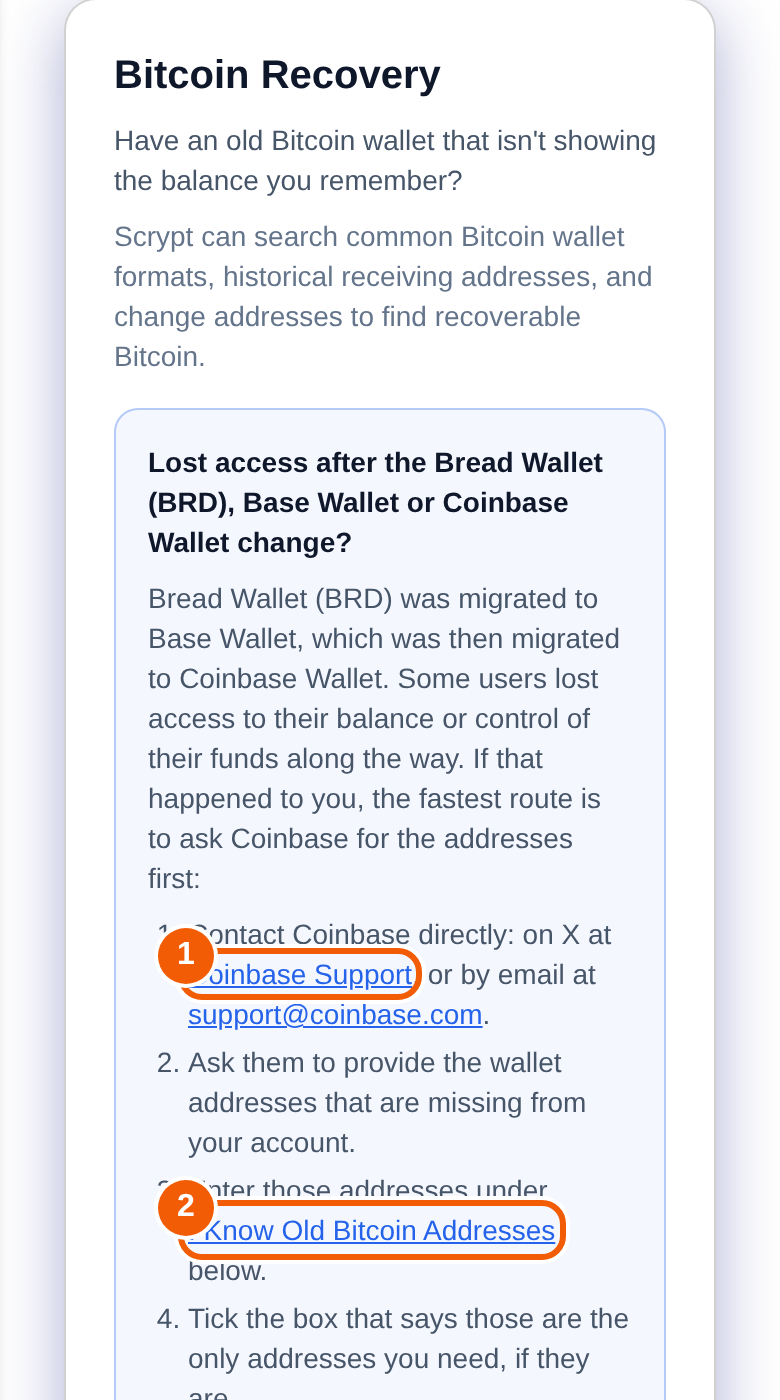
Step 3: Enter your addresses and phrase
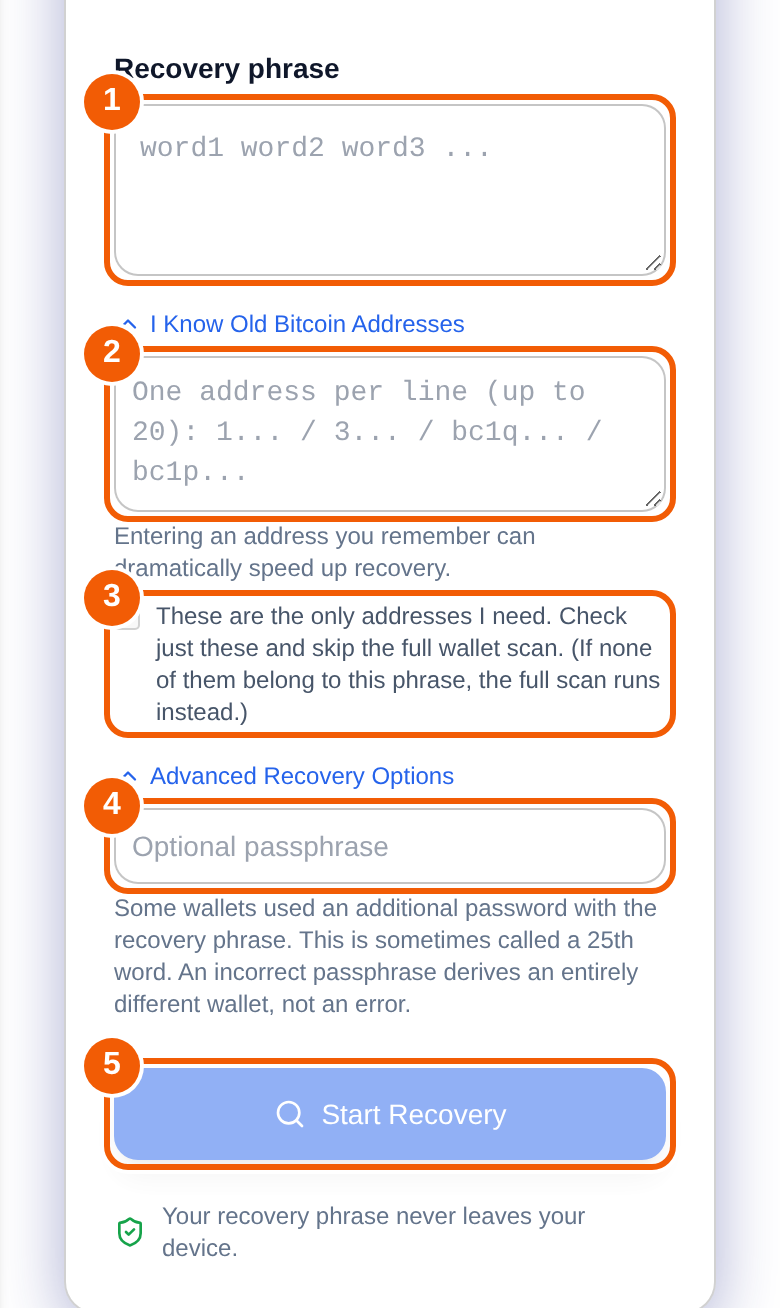
- Type your recovery phrase into ①. The tool expects 12, 15, 18, 21 or 24 words.
- Open I Know Old Bitcoin Addresses and paste the addresses Coinbase gave you into ②, one per line.
- If those are the only addresses you need, tick ③. The tool then checks just those and skips the full search. If none of them belong to your phrase, it runs the full search instead.
- Only if you used an extra password with your phrase, open Advanced Recovery Options and enter it in ④. A wrong passphrase does not give an error. It opens a completely different, empty wallet.
- Press Start Recovery ⑤.
Searching without addresses can take days and several searches, because the tool has to check a huge amount of history. Be patient. Having the addresses first makes it much faster.
Step 4: Move the Bitcoin somewhere you control
When the tool finds Bitcoin it shows where it was found. You can add the found transactions to your Scrypt Wallet history, and you can move all the Bitcoin into your own Scrypt Bitcoin wallet. Moving needs a Scrypt Wallet account (it takes about a minute to create one). You see the network fee before you confirm, and the transaction can be followed on mempool.space.
After the move, treat the old phrase as retired: do not keep using it.
If the tool finds nothing
- Double-check every word and the order of the phrase.
- Try the passphrase option if you ever set an extra password.
- Run the deeper search the tool offers, and ask Coinbase again for addresses.
- Check that the phrase belongs to the wallet that held the Bitcoin. A phrase from a different wallet will find nothing.
Frequently asked questions
Is my Bitcoin gone?
Probably not. Bitcoin stays on the blockchain at the addresses your phrase generates. What usually changes is which addresses an app looks at. If you still have the recovery phrase, the coins can normally be found.
Why did my old address history disappear?
A wallet builds your address list from your phrase using specific address formats and key paths. A newer app may not look at the ones an older app used, so the old addresses and their history stop appearing even though they still exist on the blockchain.
Do I really need the addresses from Coinbase?
No, but they make recovery much faster. Without them the tool has to search a very large range, which can take days.
Is it safe to type my recovery phrase into the tool?
The tool states that your recovery phrase stays in your browser tab, that only public addresses are looked up, and that nothing is saved to an account. Even so, only ever enter a phrase on the official addresses above, never on a page you reached from a message or an ad.
Does it recover other coins like Bitcoin Cash or Ethereum?
No. This tool searches for Bitcoin. Other coins need a different wallet or tool.
What if I lost my recovery phrase?
Then the coins cannot be recovered by anyone, including Scrypt Wallet and Coinbase. Check old notes, password managers, photos and cloud backups for the phrase.
Can Scrypt see or take my Bitcoin?
The tool only looks up public addresses. Moving funds is a transaction you confirm yourself, to a Bitcoin wallet in your own Scrypt Wallet account.