Help Center › Features
How to use Litecoin Privacy Mode (MWEB) in Scrypt Wallet
Short answer: Privacy Mode is a switch on the Litecoin page that uses Litecoin's MWEB for optional confidentiality of amounts. Turn it on and the app shows your MWEB address and balance for Litecoin. It hides amounts, not your habits, and not every service accepts MWEB, so test with a small amount first.
Questions this guide answers
- What is MWEB in Scrypt Wallet
- How do I turn on Litecoin privacy
- What is an ltcmweb address
- Can I swap MWEB Litecoin
Where it is
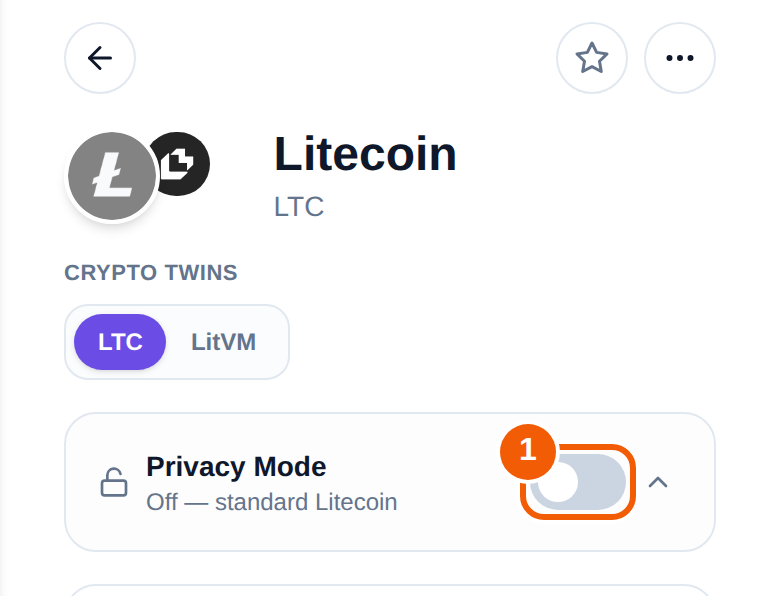
Open Litecoin from your coin list. Near the top, under the coin name, is a card called Privacy Mode. When it is off it reads "Off, standard Litecoin".
What turning it on does
Privacy Mode is a plain on and off switch over MWEB (MimbleWimble Extension Blocks), a Litecoin feature for optional confidentiality of amounts.
- While it is on, the app shows your MWEB address (it starts with
ltcmweb1) and MWEB balance for Litecoin everywhere in the app. - The first time an account turns it on, the wallet needs to set up its MWEB keys. It asks you to unlock with the same PIN, passkey or password you use to confirm a Litecoin send.
- Inside the card you can move balance from your regular wallet into Privacy Mode, and move private funds back to your regular balance. The moved amount appears after it confirms.
Limits to understand first
- It hides amounts, not your habits. It is not total anonymity.
- Not every exchange or service accepts MWEB. Check before you send.
- Swaps are not available from private (MWEB) funds yet. To swap, move them to your regular balance first.
- Send a small test amount first, and keep some funds in your regular balance.
Turn it off
Use the same switch. The card then reads standard Litecoin again. Move private funds back to the regular balance first if you want to spend them as regular Litecoin.
Frequently asked questions
Is MWEB the same as a mixer or being anonymous?
No. It adds optional confidentiality for amounts. It does not make you anonymous.
Can I send MWEB funds to any Litecoin address?
Compatibility depends on the receiving service. Not every exchange accepts MWEB, so check first and test with a small amount.
Why can't I swap my private balance?
Swaps are not available from MWEB funds yet. Move the balance to your regular Litecoin balance below the switch, then swap.
Does turning it on cost anything?
Moving funds in and out is a Litecoin transaction, so normal network fees apply. The wallet shows them when you confirm.