Help Center › Send, receive and swap
How to swap crypto in Scrypt Wallet: get a quote, check the price impact, confirm
Short answer: Open the coin you want to trade, press its swap option, choose the token to trade for, enter an amount and press Get Quote. Review the price impact and fees in the quote before you confirm. Routes depend on the provider and on liquidity.
Questions this guide answers
- How do I swap SOL for USDC in Scrypt Wallet
- Is there a swap feature in Scrypt Wallet
- What is price impact
- Why does Get Quote not work
Open the swap screen
Open a coin from your home screen. On a coin page the Swap card shows what you can swap it for. For Solana, the swap screen for SOL to USDC looks like this:
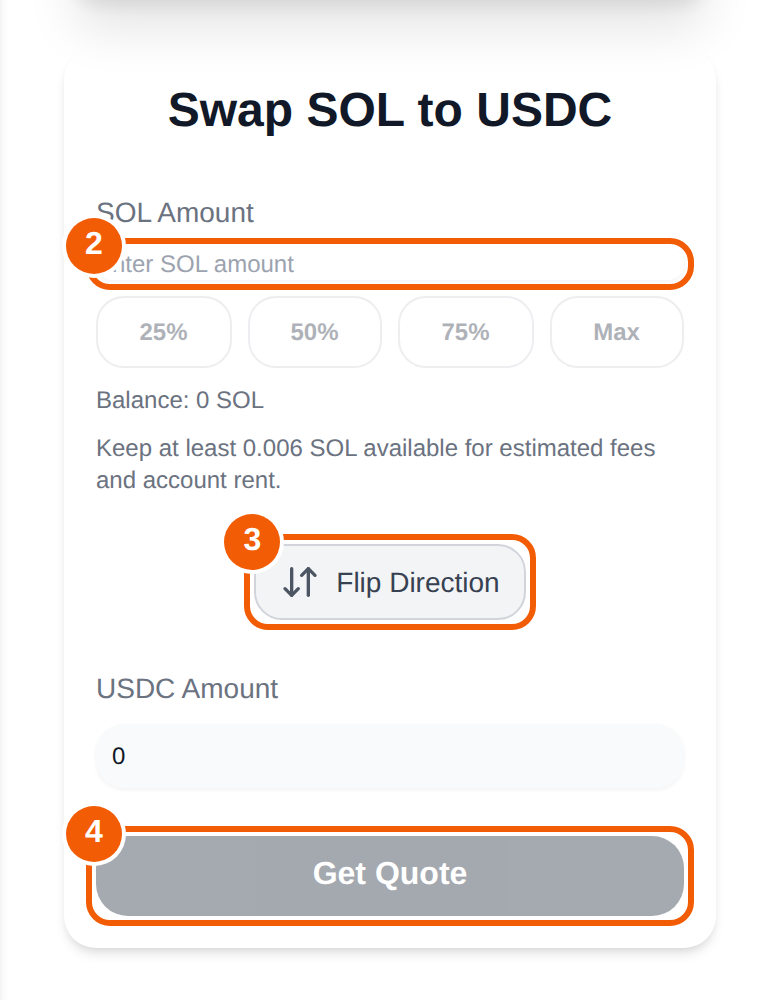
- Trade SOL for ①: pick the token you want to receive. The screen is titled with the pair, such as Swap SOL to USDC.
- Amount ②: type how much SOL to swap, or use the 25%, 50%, 75% and Max shortcuts. The balance is shown under the box.
- Flip Direction ③ swaps the sides, so you can go from USDC back to SOL.
- Press Get Quote ④.
Read the quote before you confirm
The quote shows what you would receive. Check:
- Price impact: how much your trade moves the price. Large impact usually means low liquidity.
- Fees: network and provider fees are shown in the flow.
- Output token: make sure it is the one you meant. Copy-cat tokens exist.
Keep a little SOL available for network fees and account rent. The screen reminds you to keep at least 0.006 SOL available for estimated fees. If you try to swap your entire balance, the swap may fail.
How routing works
Scrypt Wallet connects to swap providers, including Jupiter on Solana and Uniswap routing for ERC-20 tokens. Which routes exist depends on the provider and on liquidity at that moment. A pair with no route shows a message such as "Swap unavailable, no route for this coin yet". Swaps are completed by third-party services that have their own availability and fees.
Frequently asked questions
Why is Get Quote grey?
Enter an amount first. The button stays grey until the amount is valid and within your balance.
What does price impact mean?
It is the difference between the market price and the price you would actually get because of the size of your trade. Review it before you confirm.
Can I swap Litecoin or Dogecoin?
It depends on the coin and the available route. Open the coin page and look at its Swap card. Where there is no route, the card says so.
Can I schedule recurring swaps?
For SOL and Solana tokens, yes. See How to automate swaps.