Help Center › Send, receive and swap
How to send crypto from Scrypt Wallet: paste the address, review, confirm
Short answer: Press Send, paste or scan the recipient's address and Scrypt Wallet picks the coin, then enter the amount and review the recipient, asset, network and fees before you confirm. Confirmed blockchain transactions cannot be reversed, so send a small test first.
Questions this guide answers
- How do I send Bitcoin from Scrypt Wallet
- Can I send to a Scrypt ID
- How do I choose the coin when sending
- Can I reverse a crypto transaction
Start a send
Press Send on the home screen.
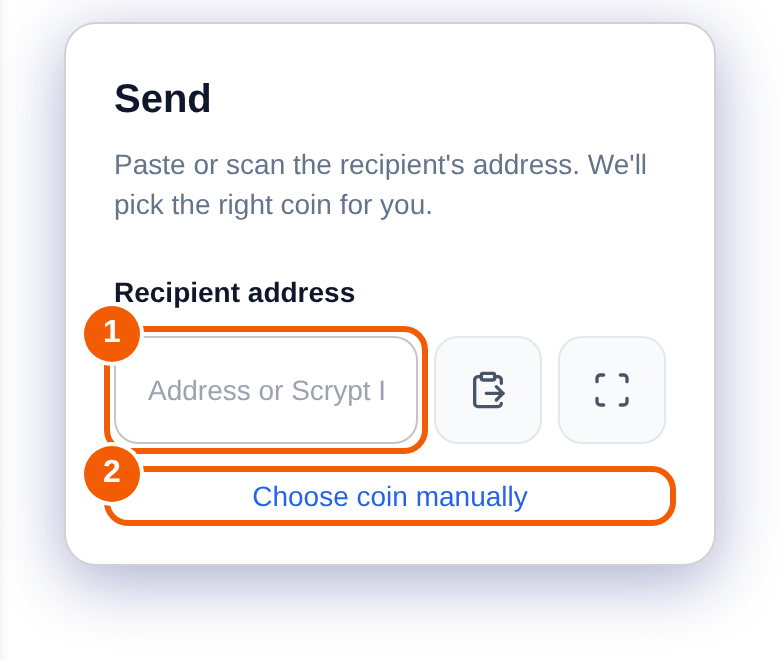
- Paste or scan ① the recipient's address. The wallet works out which coin it is for, so you do not have to choose first. You can also type a Scrypt ID such as name.scrypt in the same box.
- If the address could belong to more than one network, or you want to choose yourself, press Choose coin manually ②.
- Enter the amount.
- Review the confirmation screen. Check the recipient, the amount, the asset, the network and any fees.
- Confirm. Depending on how you locked your keys, the wallet may ask for your PIN, passkey or password.
Before you confirm: a short checklist
- Does the address match what the recipient gave you, character by character? Do not trust only the first and last few characters.
- Is it the right coin and network? A coin sent on the wrong network usually cannot be recovered.
- Did you send a small test first for a large transfer?
- Are you on wallet.scryptwallet.io, not a look-alike site?
A confirmed blockchain transaction cannot be reversed, and Scrypt Wallet cannot recover coins sent to a wrong address.
After you send
Open Transactions to see it, and paste the transaction id into the coin's block explorer to follow confirmations. If something looks wrong, see My deposit has not arrived.
Frequently asked questions
Can I send to a Scrypt ID instead of a long address?
Yes, the address box accepts a Scrypt ID. See How to claim a Scrypt ID.
Why does it ask which network?
Some coins share an address format. Confirm the network with the person or service you are paying.
Can I cancel a transaction after confirming?
No. Once confirmed on the blockchain it cannot be reversed.
Why does my balance look too low to send?
Network fees are paid from your balance. The confirmation screen shows the fee, so leave room for it.