Help Center › Features
How to claim a Scrypt ID (yourname.scrypt) and link your wallet addresses
Short answer: A Scrypt ID is a readable name like yourname.scrypt that points to the addresses you choose, so people can pay a name instead of a long address. Open Profile, choose Scrypt ID, type a name, pick the coins to link and press Claim name. Your first name is free.
Questions this guide answers
- What is a Scrypt ID
- How do I get a .scrypt name
- Can I send crypto to a name instead of an address
- Is a Scrypt ID free
What a Scrypt ID is
A Scrypt ID is a human-readable name like yourname.scrypt. Use it to send and receive transactions with other users without copying long addresses. It is identity only: it points to addresses you choose and never holds funds.
Claim yours
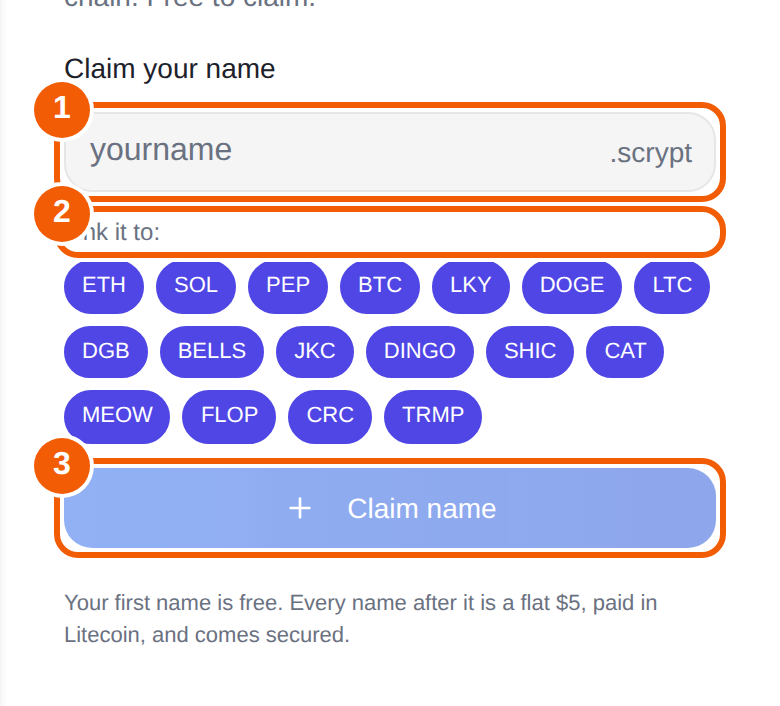
- Open Profile and choose Scrypt ID (it says "Claim a .scrypt name"). New wallets may also see the claim dialog on first run.
- Type the name you want in the box ①. The ending .scrypt is added for you.
- Under Link it to ②, tap the coins you want the name to resolve for, such as ETH, SOL, BTC, LTC or DOGE. The coins you tap are the addresses people will reach.
- Press Claim name ③.
Cost
Your first name is free. Every name after it is a flat $5, paid in Litecoin, and comes secured.
Using it
Share your Scrypt ID with people who want to pay you. When someone sends from Scrypt Wallet, they can type your Scrypt ID in the recipient box instead of an address. See How to send crypto.
Tips
- Link only the coins you actually use.
- If you receive on a coin you did not link, the name will not resolve for it.
- A Scrypt ID is not a backup. It does not recover your wallet.
Frequently asked questions
Is a Scrypt ID free?
Your first name is free. Each additional name is a flat $5, paid in Litecoin.
Does a Scrypt ID hold my money?
No. It is identity only. It points to addresses you choose.
Can I skip it?
Yes. The first-run dialog has a Skip for now button, and you can claim a name later from Profile.
Which coins can I link?
The claim screen lists the coins available to link, including coins such as ETH, SOL, PEP, BTC, LKY, DOGE and LTC.