Help Center › Send, receive and swap
How to set up recurring swaps with Automate Swaps in Scrypt Wallet
Short answer: On the SOL to USDC swap screen, open Automate Swaps, pick a direction, enter an amount per swap, choose how often to repeat and press Start automating. It runs while Scrypt Wallet is open and unlocked, so a closed wallet will not fire swaps until you reopen it.
Questions this guide answers
- Can Scrypt Wallet do recurring buys
- How do I schedule SOL swaps
- Does Automate Swaps work when the app is closed
- What is Advanced mode in Automate Swaps
What it does
Automate Swaps repeats a swap on a schedule instead of you swapping by hand. It works for SOL and Solana (SPL) token swaps through Jupiter, and Advanced mode adds days, time windows, price ranges and price orders. The example below uses the SOL and USDC pair.
Set one up
Open the swap screen for SOL and USDC, scroll down and open Automate Swaps.
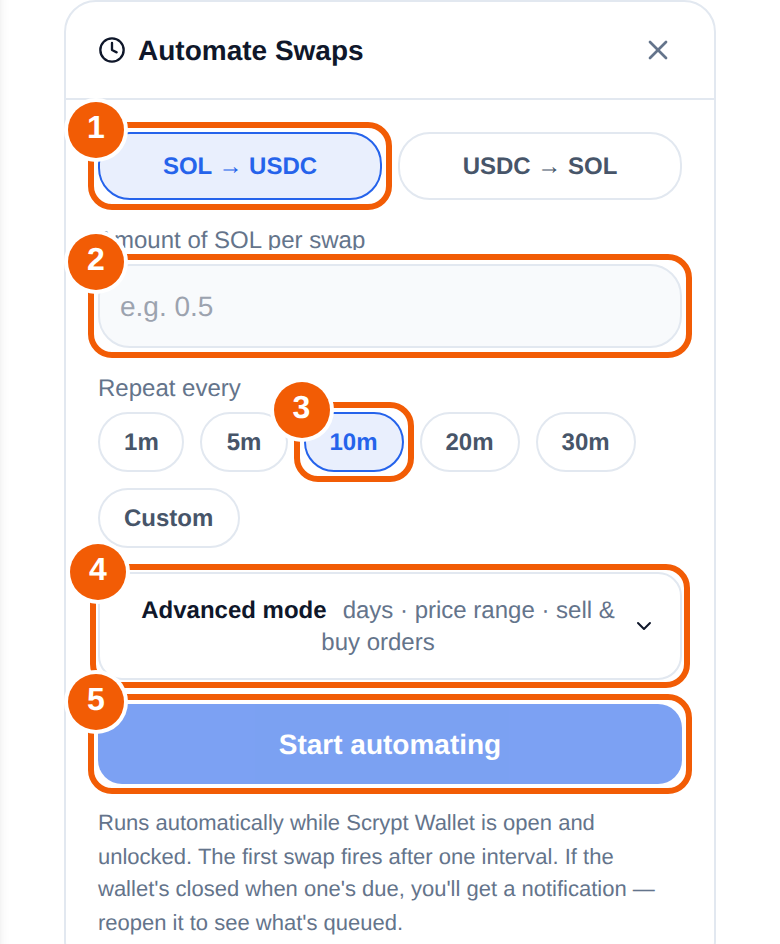
- Direction ①: choose SOL to USDC or USDC to SOL.
- Amount ②: type how much to swap each time (for example, the SOL amount per swap).
- Repeat every ③: pick 1m, 5m, 10m, 20m or 30m, or choose Custom.
- Optional Advanced mode ④: restrict the swaps to chosen days and time windows, or set a price range or sell and buy orders.
- Press Start automating ⑤.
How it behaves
- It runs automatically while Scrypt Wallet is open and unlocked.
- The first swap fires after one interval, not instantly.
- If the wallet is closed when a swap is due, you get a notification. Reopen the wallet to see what is queued.
Good habits
- Start with a small amount and watch the first few swaps.
- Remember each swap has network fees and price impact, and the price can move between swaps.
- Check it regularly and stop it when you no longer want it.
- Keep some SOL for fees.
Swaps are completed by third-party services that have their own availability and fees, and nothing here promises a result.
Frequently asked questions
Does it run when the app is closed?
No. It runs while Scrypt Wallet is open and unlocked. If a swap is due while the wallet is closed, you are notified and can reopen it.
How often can it swap?
You choose the interval: 1, 5, 10, 20 or 30 minutes, or a custom interval.
Can I limit it to certain prices or times?
Yes, with Advanced mode: days, time windows, price ranges and sell and buy orders.
Which tokens can I automate?
Automate Swaps supports SOL and Solana (SPL) tokens through Jupiter. On the SOL and USDC swap screen it offers SOL to USDC and USDC to SOL.
Does it tell me what to trade?
No. It only repeats a swap you configure. You are responsible for the settings.