Help Center › Features
How to use Earn in Scrypt Wallet: compare yield options and read the risks first
Short answer: Earn lists yield options for an asset, such as USDC on Solana, from providers like Jupiter Lend and Morpho. Choose an asset and network, compare the providers, and read each venue's terms and risks before you deposit. Rates change and returns are never guaranteed.
Questions this guide answers
- What is Earn in Scrypt Wallet
- How do I earn yield on USDC in Scrypt Wallet
- Is Earn safe
- What does Average APY Unavailable mean
What Earn is
Earn puts yield options from different providers next to each other, so you can compare them in one place. It does not choose for you and it does not promise anything. Each venue has its own terms and risks.
The Earn page
Open Earn from the home screen card or from the wallet.
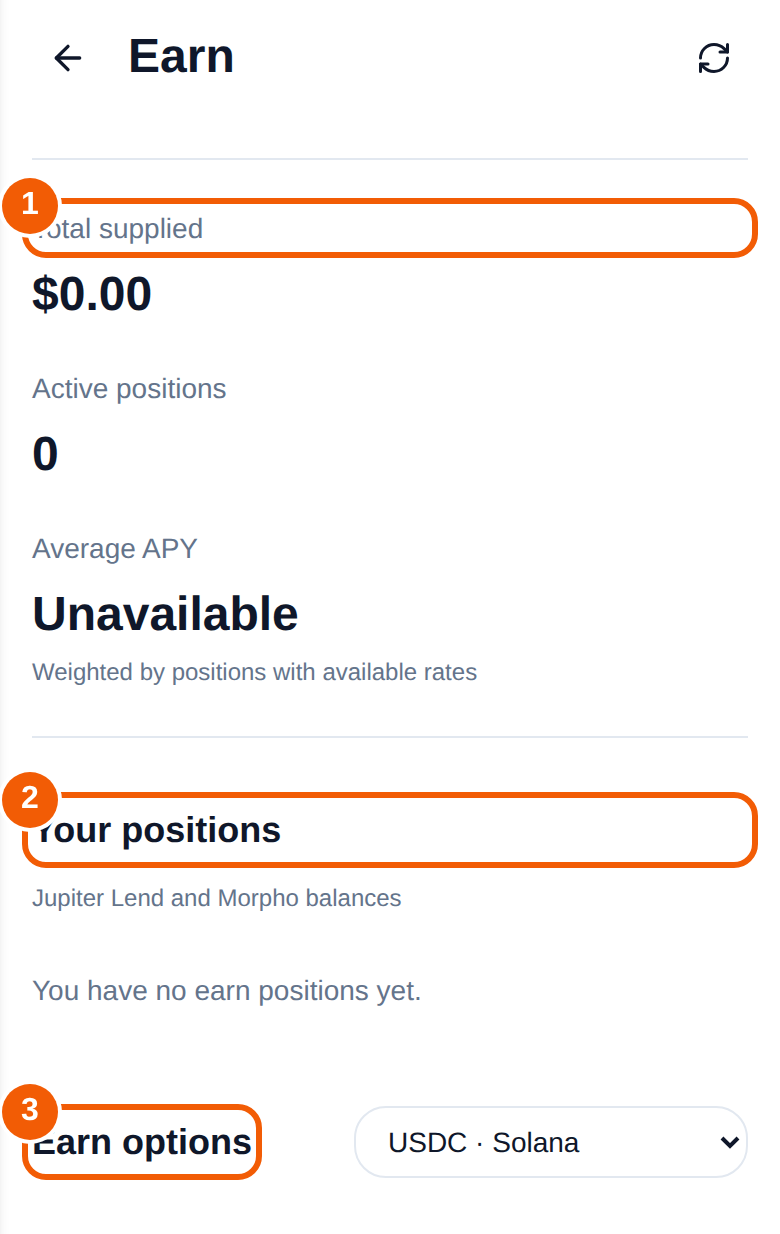
- Total supplied ① is the value you have deposited through Earn. A new wallet shows $0.00.
- Active positions counts your open deposits.
- Average APY is weighted by positions with available rates. It says Unavailable when you have no positions with a published rate.
- Your positions ② lists balances at providers such as Jupiter Lend and Morpho. It says "You have no earn positions yet" until you deposit.
- Earn options ③ is where you pick an asset and network, such as USDC on Solana. Each provider row shows its published rate and a Deposit / withdraw button.
Before you deposit
- Read the provider's terms and the kind of product it is: lending, liquidity, vault, CeFi or staking each carry different risks.
- Check withdrawal rules: when and how you can take your money out.
- Remember that rates change and are shown where providers publish them.
- Start with an amount you are comfortable losing, and review the confirmation screen.
Returns are never guaranteed. Providers can pause withdrawals, change rates or fail.
Frequently asked questions
Does Scrypt Wallet hold my Earn deposit?
Deposits are made to the provider you pick, under that provider's terms. Read them in the flow before you confirm.
Why does Average APY say Unavailable?
It averages the rates of your open positions. With none, or none with a published rate, there is nothing to average.
Are the rates fixed?
No. Rates change and are shown where providers publish them. Returns are never guaranteed.
Which assets can I use?
Choose from the asset and network list on the Earn page. What is offered depends on the providers.